
Keyboards · Buying Guide
Wired Keyboard Cable Snags Your Mouse and Ghosts Your Keys? The Basike 75% Wireless Fixes It (2026)
It is 9:47 PM. Ranked match in progress, you hold W+Shift+Space for the bunny hop, the mouse flicks right — and the keyboard cable snags it mid-flick. The aim dies. You blame sensitivity, the pad, the day. But the tech press keeps saying the quiet part out loud: Wirecutter and Currys list the cable as the first obstacle of a gaming desk, 2026 keyboard guides repeat that standard office boards start "ghosting" at three simultaneous keypresses — exactly the FPS and MOBA combo — and every honest full-size review admits the obvious: it eats 10 to 15 centimeters of desk your low-sensitivity mouse needs.
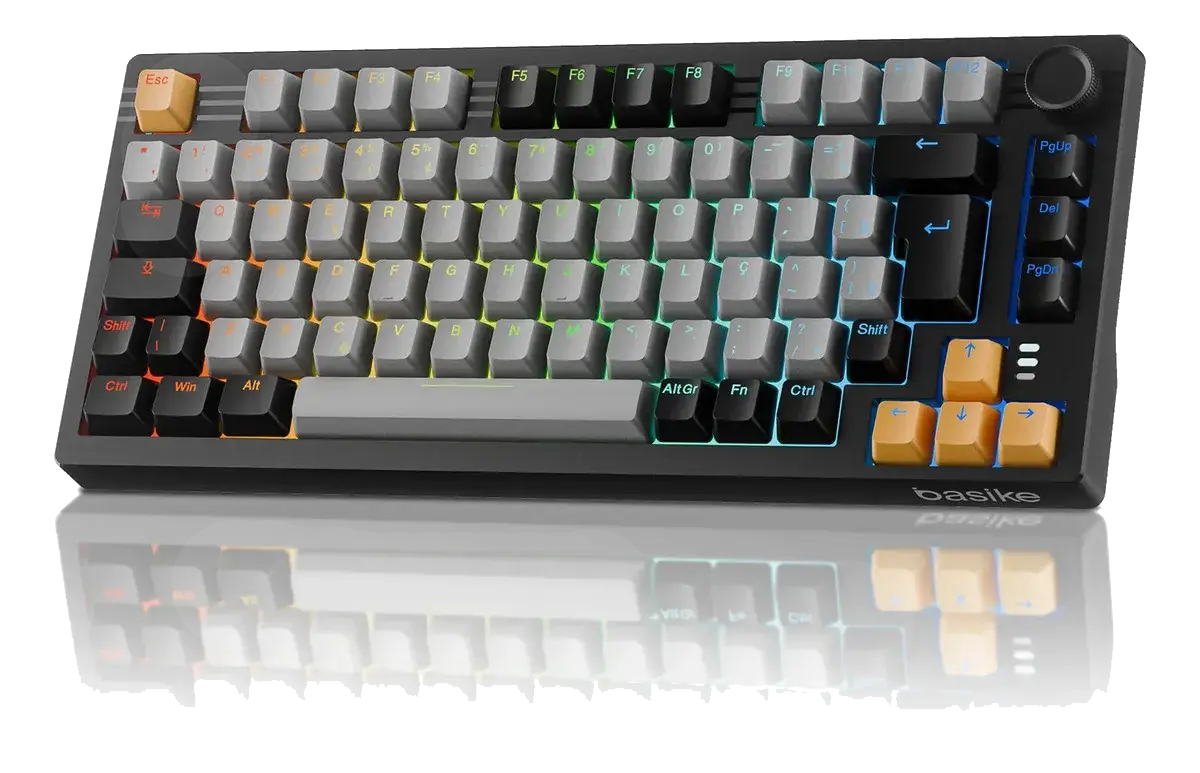
Here is the part sellers will not tell you: you do not need a R$ 900 keyboard to get out of this. The Basike 75% wireless mechanical gaming keyboard, currently listed at R$ 308 on Mercado Livre, was designed around exactly those complaints: a real ABNT2 layout, three connection modes, full anti-ghosting, Gateron hot-swap switches and a 4000mAh battery. This guide walks through the ten everyday problems it solves, the honest numbers behind each fix, and a head-to-head against the Redragon Fizz Pro — the best-known rival in the same price band — so you can see what the layout difference really buys you.
The Short Answer
- The three biggest keyboard pains of 2026 are cable drag, multi-key ghosting and no desk space, and every buying guide in the category puts them ahead of RGB and branding.
- The Basike 75% attacks all three at the hardware level: tri-mode connectivity (USB-C + 2.4GHz dongle + Bluetooth for 3 devices), full N-key rollover anti-ghosting on all 82 keys, and a 75% body that frees 10 to 15cm for the mouse.
- The latency that scares wireless shoppers is solved by the 2.4GHz dongle: independent tests measure 1–5ms, indistinguishable from wired for most players; Bluetooth (8–20ms) stays for typing and work.
- A 4000mAh battery with a built-in plan B: about a week of mixed use with RGB on low, a low-battery blink on the Esc key, and play-while-charging over USB-C.
- It is not a R$ 900 keyboard in disguise, and we say where: no number pad, RGB managed on the keyboard itself (no deep per-key software), and ABS-class materials.
- Versus the Redragon Fizz Pro, the Basike wins on battery (4000mAh vs ~1900mAh), retained keys (F1–F12, navigation cluster and arrows) and the media knob; the Fizz Pro is more compact because it is 60%.
- Verdict: if your cable snags the mouse, your keys fail mid-combo and your board eats the desk, the Basike 75% solves all three for R$ 308.
The 10 Everyday Problems the Basike 75% Solves
2026 gaming-keyboard buying guides (Wirecutter, Currys, Gaming PC Advice and others) converge on the same frustration hierarchy: connection, space, key registration and comfort. Below, each pain, its real cause and how the Basike 75% answers it.
| # | The pain | The real cause | How the Basike 75% solves it |
|---|---|---|---|
| 1 | The keyboard cable snags the mouse mid-play (the #1 cable-clutter complaint in buying guides) | Board tethered to the tower by USB, cable crossing the pad | Tri-mode: game on the 2.4GHz dongle (1–5ms in independent tests) with zero cables on the desk; USB-C stays in the drawer for when the battery drops |
| 2 | A full-size board eats 10–15cm of desk and forces the mouse past the pad's edge | 144-key layout with a number pad nobody uses in game | 75% body, 82 keys (14 × 33 × 4cm): real space back for low-sensitivity flicks without losing F1–F12 or arrows |
| 3 | Ghosting: in the middle of W+Shift+Space+Q, one key simply does not register | Cheap key matrix failing at 3+ simultaneous keys — standard on office membrane boards | Full anti-ghosting with N-key rollover on every key: every combination registers, from bunny hops to strafe-crouches |
| 4 | Fear that a wireless keyboard "lags" your aim | Slow Bluetooth (8–20ms) and old 2.4GHz implementations | 2.4GHz dongle in the 1–5ms range — close enough to wired for 99% of players; Bluetooth handles laptop and tablet |
| 5 | A membrane board goes mushy, loses feedback and "dies" by month three | Crushed rubber under the plate, no mechanical switch | Gateron G Pro 3.0 linear switches, factory-lubed: consistent travel from the first to the millionth click |
| 6 | Imported ANSI board without the keys you need — wrong layout, remapped punctuation | Generic ANSI floods the market | Native ABNT2 with 82 keys at 75% — rare on tri-mode boards in this price band (see FAQ for layout notes) |
| 7 | The battery dies mid-ranked and the keyboard becomes a paperweight | Small cells (1000–2000mAh) with no warning | 4000mAh battery: days of use with RGB on low, low-battery alert blinking on Esc, and USB-C play-while-charging |
| 8 | Clicky switches announce every key in the shared room and on voice chat | Blue-style switches with an audible click | Gateron G Pro 3.0 linears: verified buyers specifically praise the smooth, quiet typing |
| 9 | You want to swap switches and the board is not hot-swap — toss it or solder | Cheap boards with soldered switches | 3/5-pin hot-swap socket, with switch and keycap pullers in the box: a 10-minute swap, no soldering |
| 10 | Branded tri-mode mechs push past R$ 450–900 to fix all of the above | Brand tax and software RGB | R$ 308 for the solutions to pains 1–9 — under the 90-day average (R$ 314) and the official Basike store (R$ 399.90) |
Basike 75%: The Specs That Matter
Connectivity. Three worlds in one board: wired USB-C (minimum latency and simultaneous charging), a 2.4GHz dongle (the everyday gaming mode), and Bluetooth for up to 3 paired devices, switched with a key combination. The dongle works on PC, laptop and the PS4 validated in the listing; the Win/Mac switch adapts the layout per machine.
Key registration. Full anti-ghosting with N-key rollover on every key — not just the WASD cluster. It is the difference between a key registering "every time" (the Currys argument for mechanical switches) and discovering ghosting in the worst round of the night. A free online ghosting test takes 30 seconds if you want to check your current board before buying anything.
Switches and hot-swap. Gateron G Pro 3.0 linears, factory-lubed: smooth for long typing sessions, quiet for voice chat. The socket takes 3-pin or 5-pin mechanical switches, and the box includes both pullers — the upgrade path to clicky, tactile or rapid-trigger without buying a new keyboard.
75% body. 82 keys, 14 × 33 × 4cm, full F1–F12, navigation cluster and complete arrows, feet adjustable to 45°. You lose the number pad — spreadsheet lives should look at 96% boards — and get mouse space back.
Battery and media. 4000mAh, the top of the category for 75% tri-mode boards; the low-battery alert blinks on Esc and auto-sleep wakes on keypress. The media knob rotates for volume and presses for play/pause and mute, with 6 RGB modes controlled on the keyboard itself.
Basike 75% vs Redragon Fizz Pro: the R$ 300 Duel
The Redragon Fizz Pro is the rival most mentioned when the search is "cheap ABNT2 wireless mechanical keyboard". Both are tri-mode, hot-swap and ABNT2-friendly — the real decision comes down to how many keys you keep and how much battery you carry. The numbers side by side.
| Feature | Basike 75% | Redragon Fizz Pro |
|---|---|---|
| Price (reference band, 2026) | R$ 308 | UPDATE (~R$ 250–320 band) |
| Layout | 75%, 82 keys, ABNT2, F1–F12 + arrows + navigation cluster | 60%, ABNT2; F-keys and arrows on an Fn layer |
| Connectivity | USB-C + 2.4GHz + Bluetooth (3 devices) | USB-C + 2.4GHz + Bluetooth |
| Switches | Gateron G Pro 3.0 factory-lubed linears, 3/5-pin hot-swap | Redragon switches, 3/5-pin hot-swap |
| Battery | 4000mAh — days of use with RGB on low | ~1900mAh — shorter runtime with RGB |
| Anti-ghosting | N-key rollover on every key | Full anti-ghosting (NKRO over USB) |
| Media knob | Yes: volume + play/pause/mute | No — media via Fn |
| Desk space | Frees ~10–15cm (75%) | Frees even more (60%) |
| Tools included | Switch puller + keycap puller | Usually a simple puller |
| Best for | Gamers who want ABNT2 tri-mode with F-keys, big battery and knob | Gamers who prioritize maximum compactness and carry the board in a bag |
Two numbers decide the purchase: first, battery — 4000mAh against ~1900mAh is double the endurance for the Basike, and it is the difference between charging once a week or every few days with RGB on. Second, retained keys: the Fizz Pro's 60% is more compact, but moves F1–F12, the navigation cluster and arrows to Fn layers — you gain centimeters and lose immediacy in shortcuts, spreadsheets and games that use F-keys. If your pain is the cable and the space but you still rely on real F-keys and arrows, 75% is the balance point. If your pain is the backpack, 60% wins.
Full details in our Basike 75% wireless mechanical gaming keyboard review, where we push latency, battery and hot-swap further.
Basike 75%: Pros and Cons
Pros
- Ends desk cable drag: tri-mode USB-C, 2.4GHz and Bluetooth for 3 devices
- Full anti-ghosting: N-key rollover on every key, no key swallowed mid-combo
- Native ABNT2 layout in 82 keys — rare at this price
- 75% body returns 10–15cm to the mouse while keeping F1–F12 and arrows
- 4000mAh battery with Esc-key alert and charge-while-playing
- Gateron G Pro 3.0 hot-swap with pullers included — solder-free upgrades
- Media knob and 6 RGB modes adjustable on the board
- R$ 308, under the 90-day average (R$ 314) and the official store (R$ 399.90)
Cons
- No number pad — heavy spreadsheet users should consider 96%/full-size
- RGB on maximum drains the battery much faster
- Bluetooth is not for competitive play (8–20ms): use the 2.4GHz dongle
- ABS-class materials — no aluminium chassis at this price
- No vendor software for per-key macros (adjustments live on the keyboard)
Redragon Fizz Pro: Pros and Cons
Pros
- 60% format even more compact and portable than 75%
- Tri-mode and hot-swap on the same concept as the Basike
- ABNT2 available — a legitimate rival on the same layout problem
- Strong brand presence and spare parts in Brazil
Cons
- Smaller battery (~1900mAh): more charge cycles with RGB on
- No physical F-keys or arrows: everything on Fn layers slows shortcuts down
- No media knob
- Full peripherals require learning a two-layer keymap
When the Redragon Fizz Pro Is Still the Right Choice
Honesty matters more than the sale. If you carry the board in a backpack every week, desk space is 60cm or you mostly play games that never touch F-keys (and do not live in spreadsheets), the Fizz Pro's 60% format delivers maximum compactness — and it is often a few reais cheaper. Everyone else, whose real complaint is the cable snagging the mouse, keys failing mid-combo and the board eating the desk without giving up F-keys and arrows, is better served by the Basike 75%, with double the battery and the media knob on top.
Frequently Asked Questions
Is a wireless keyboard fast enough for FPS and MOBA?
On the 2.4GHz dongle, effectively yes. Independent latency tests put good 2.4GHz implementations at 1–5ms — close enough to wired for the vast majority of players. Bluetooth runs at 8–20ms and can add jitter, so keep it for laptop, tablet and typing. The Basike's plan B is USB-C: plug in, play, and charge at the same time.
Does the cable really hurt my gameplay? Do I need wireless?
If your low-sensitivity mouse has ever been pulled off the pad by the cable, yes. 2026 buying guides list cable clutter as the first benefit of a wireless keyboard — not aesthetics, but biomechanics: with no cable crossing the desk, the mouse follows the full arm movement. On the Basike's 2.4GHz dongle the desk stays clean and latency is not an excuse.
Does it have a native layout for my region?
Yes for ABNT2 regions (Brazil): factory ABNT2, 82 keys at 75%, with the Ç key and correct Portuguese accents — one of the few compact tri-mode boards sold with ABNT2 out of the box, and the main reason buyers pick it over generic ANSI imports. If you type on ANSI or ISO English, the physical layout still works; check the FAQ in our full review for Mac and PS4 notes.
Does it register every key at the same time (anti-ghosting)?
Yes: full anti-ghosting with N-key rollover on every key, not just the WASD cluster. Combos like W+Shift+Space+Q+C in flight, or 5–6 key fighting-game macros, register completely. If you want to check the board you use today, free online ghosting tests show in 30 seconds which combinations fail.
How long does the 4000mAh battery last with RGB on?
The category standard for 75% tri-mode boards with 4000mAh: about a week of mixed office use with lighting on low, several days with lighting off, and one to two days at maximum RGB — battery and RGB always fight. The low-battery alert blinks on Esc, and you can keep playing over USB-C while it charges.
Is it loud? Will it bother people nearby?
Far less than clicky boards. The stock Gateron G Pro 3.0 switches are linear with no audible click, and verified buyers specifically praise the smooth, quiet typing. It is not membrane-silent, but it does not announce every key on voice chat or in a shared room.
Basike 75% or Redragon Fizz Pro: which one?
Both fix cable, ghosting and ABNT2. The Fizz Pro (60%) is more compact and portable; the Basike (75%) keeps physical F1–F12, arrows and navigation keys, doubles the battery (4000mAh vs ~1900mAh) and adds a media knob. If desk space and shortcuts matter, Basike; if the backpack rules, Fizz Pro.
Fix the Cable, the Ghosting and the Desk Today
Live prices from trusted Mercado Livre sellers. Basike 75% ABNT2 wireless mechanical gaming keyboard, 82 keys, tri-mode, hot-swap, new, with warranty.
As affiliates, we may earn a commission on purchases made through our links, at no extra cost to you. It never changes our opinion.