
Controllers · Troubleshooting guide
Xbox Controller Not Connecting or Disconnecting? Fix It in 10 Minutes (2026)
You press the Xbox button, the light blinks, and nothing happens. Or worse: it pairs, you start a match, and the controller disconnects exactly when the boss appears. On PC it is the same story — Windows sees a generic gamepad, Steam refuses to recognize the triggers, and the sticks slowly start drifting on their own.
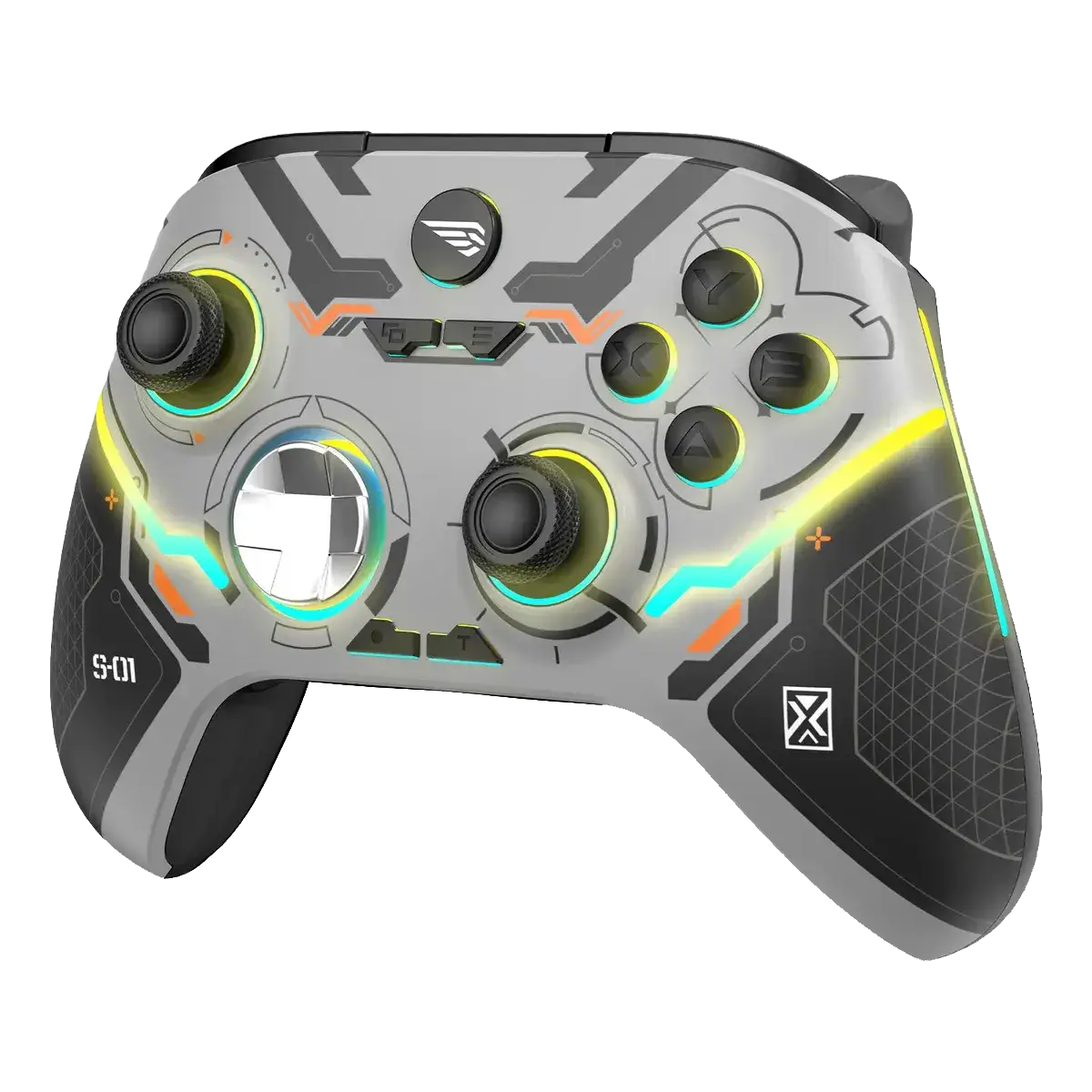
Most of these failures are not a dead controller. They are pairing state, a flat battery, interference, or a stick that needs recalibration. The silver wireless Xbox-style controller sold for R$ 253,84 does the basics right — Xbox Series S/X, Xbox One, PC and Steam, precise analog sticks, built-in rumble and a 3.5mm headset jack — but it has two honest limits: about 7 hours per charge and no Hall-effect sticks. This guide covers the ten failures that actually happen, the official re-pair and reset order, and how it compares with the Sony DualSense before you spend anything.
Quick Answer
- Won't pair? Turn the console on, hold the pair button on the console until it flashes, then hold the controller's pair button for 3 seconds. Pair from the console menu, not from the game.
- Disconnects mid-game? Charge it first — at ~7 hours the battery is the weakest point. Then remove obstacles and 2.4GHz interference, and test wired over USB.
- Works on PC but not on Xbox (or the reverse)? The controller keeps a separate pairing per device. Re-pair instead of assuming it is broken.
- Stick drift? Clean the stick base, test the dead zone in the Xbox Accessories app or Steam, and only then consider a repair — this model has no Hall-effect sticks.
- Buttons or rumble dead? Update the controller firmware on PC and test each input in the Accessories app or gamepad tester.
- Real specs: Xbox Series S/X, Xbox One, PC and Steam; Bluetooth plus wireless; built-in rechargeable battery (~7h); 3.5mm jack; vibration; no share button and no adaptive triggers.
- Verdict: try the free re-pair, reset and calibration first. If the board is genuinely dead, this is the low-risk budget replacement at R$ 253,84.
The 10 Failures (and the Fix That Works)
Every "broken Xbox controller" story is one of a handful of problems. Here is each symptom, the real cause and the fix — including the cases this controller's design already prevents.
| # | Symptom | Real cause | Fix / how this controller handles it |
|---|---|---|---|
| 1 | Controller will not pair with Xbox Series S/X | The console is waiting for a different pad, or the controller is still paired to a PC | Hold the console pair button until it flashes, then hold the controller pair button 3s. If needed, forget the PC pairing first |
| 2 | Disconnects mid-game or after a few minutes | Low battery, distance, walls or 2.4GHz interference | Charge over USB; keep the pad within 3m; remove USB 3.0 hubs and routers from the line of sight; test wired |
| 3 | Works on PC but not on the console (or the reverse) | Each device stores its own pairing and the pad only remembers one at a time | Re-pair whenever you switch device; do not assume the controller is faulty |
| 4 | Stick drift — the character moves alone | Worn potentiometers, dust at the stick base or a wrong dead zone | Clean the base, calibrate in the Xbox Accessories app or Steam, then test. No Hall-effect sticks on this model |
| 5 | A button, bumper or trigger does not respond | Dirt under the membrane, a stuck trigger or a firmware glitch | Update firmware on PC, test every input in a gamepad tester, clean around the button with isopropyl alcohol on a swab |
| 6 | Vibration or rumble not working | Rumble disabled in the game or console, or a weak battery | Enable vibration in the game/console settings, charge fully, then test rumble in the Accessories app |
| 7 | Battery dies in about 7 hours or will not charge | Small built-in cell, USB cable/charger issue or a tired battery | Expect ~7h per charge; charge 2–3h over USB-C or micro-USB with a known-good cable and 5V charger |
| 8 | Controller will not turn on, no LED | Completely flat battery or a failed charging port | Leave it 30 minutes on a wall charger, try another cable, then hold the Xbox button 10s to reset |
| 9 | Input lag or delayed response | Bluetooth interference, low battery or a wireless dongle far from the console | Move closer, charge it, and prefer the dedicated wireless connection on Xbox or a USB cable on PC |
| 10 | Headset or mic not working through the pad | Wrong jack standard (CTIA vs OMTP) or a disabled audio profile | Use a CTIA 3.5mm headset, push the plug fully in, and check the console/PC audio input settings |
How to Re-Pair and Reset the Controller (Official Order)
Before touching any setting, do the boring part in the right order. A controller that is 10% charged or still paired to another device will fail in ways that look like hardware faults.
- Charge it for at least 30 minutes with a known-good USB cable and a 5V wall charger. A flat cell cannot keep a wireless link alive.
- Turn the console on and make sure no other controller is connecting.
- Press and hold the pair button on the console (the small button near the USB ports) until the Xbox light flashes.
- Press and hold the pair button on the controller for about 3 seconds, until the Xbox button flashes quickly.
- Wait for the light to become solid. If it keeps blinking, repeat the sequence once — the console times out quickly.
- Reset the controller: hold the Xbox button for 10 seconds until it turns off, then turn it back on. This clears temporary pairing glitches.
- On PC, open Settings → Bluetooth and remove the old "Xbox Wireless Controller" entry, then pair again. On Steam, enable Xbox controller support in Settings → Controller.
- Update the firmware on PC with the Xbox Accessories app if it recognizes the pad. Third-party pads may not support every advanced setting, but basic firmware updates usually work.
If the LED never flashes even while charging, the battery or charging port is the problem. If the light works but no console or PC ever sees the pad, that is a radio fault and the warranty is the right path, not another reset.
Xbox-Style Controller vs Sony DualSense
If the free fixes do not save your old pad, these are the two controllers we actually recommend. They solve the same pain differently: the Xbox-style pad is the cheap multiplatform workhorse, while the DualSense is the immersion upgrade for PS5 and PC.
| Feature | Xbox-Style Controller (Silver) | Sony DualSense |
|---|---|---|
| Price (reference) | R$ 253,84 | R$ 404,27 |
| Platforms | Xbox Series S/X, Xbox One, PC, Steam | PS5, PC (USB or Bluetooth, game-dependent) |
| Connectivity | Bluetooth + dedicated wireless | Bluetooth + USB-C |
| Battery | Built-in, about 7 hours | 1,560mAh, about 6–12 hours |
| Haptics | Standard vibration | Dual actuators with haptic feedback |
| Adaptive triggers | No | Yes, on supported PS5 games |
| Headset jack | 3.5mm | 3.5mm |
| Share button | No | Create button |
| Best for | Cheap Xbox and PC play, easy replacement | PS5 immersion, haptics and adaptive triggers |
Honesty before sale: the DualSense is the more advanced controller — haptics, adaptive triggers, a built-in microphone and better battery range. The Xbox-style pad wins on what matters when things go wrong: it costs 37% less, connects natively to Xbox consoles and PC, uses a standard 3.5mm jack and is easy to replace without drama. If you play mainly on Xbox or want a second pad for local co-op, this is the sensible buy.
Xbox-Style Controller: Main Characteristics
- Compatibility: Xbox Series S/X, Xbox One, PC and Steam
- Connection: Bluetooth for PC plus dedicated wireless for Xbox consoles
- Controls: precise analog sticks, responsive D-pad, textured grips and tactile face buttons
- Rumble: built-in vibration for compatible games
- Battery: built-in rechargeable cell, about 7 hours per charge, 2–3 hours to refill
- Audio: 3.5mm stereo headset jack
- Design: glossy silver finish with LED lighting and textured rear grips
- Charging: USB-C or micro-USB depending on the batch — check the cable in the box
- Limits: no share button, no adaptive triggers, no Hall-effect sticks and no full Xbox Accessories app support
- Warranty: standard marketplace warranty; keep the invoice
Xbox-Style Controller: Pros and Cons
Pros
- R$ 253,84 — much cheaper than an official Xbox or DualSense pad
- Works on Xbox Series S/X, Xbox One, PC and Steam
- Precise sticks and responsive triggers for the price
- Built-in rechargeable battery — no AA batteries to buy
- 3.5mm headset jack for voice chat and private audio
- Attractive silver finish with LED lighting
- Easy, low-risk replacement for a second controller or co-op
Cons
- About 7 hours per charge — short next to the official pad
- No share button for screenshots and clips
- No adaptive triggers or advanced haptics
- No Hall-effect sticks, so drift is possible over time
- Third-party model: may lack full Xbox Accessories app support
- Build is good but not premium — visible plastic seams
DualSense: Pros and Cons
Pros
- Haptic feedback and adaptive triggers create real immersion
- Built-in microphone and Create button
- 1,560mAh battery, about 6–12 hours of play
- Excellent build quality and ergonomics
- Native PS5 experience plus solid PC support via USB
Cons
- R$ 404,27 — 59% more expensive than the Xbox-style pad
- Adaptive triggers and haptics are limited on PC
- Battery still drains fast in haptic-heavy games
- Stick drift is a known long-term complaint
- Overkill if you only play on Xbox
When the DualSense Is the Better Call
If you own a PS5 and want the controller that actually uses the console's haptics and adaptive triggers, the Sony DualSense is the honest pick — and our DualSense battery guide shows how to make it last a full session. But if your console is an Xbox, if you split time between Xbox and PC, or if you need a cheap second pad for friends, the Xbox-style controller does the job for R$ 150 less and with a standard headset jack.
FAQ
Why won't my Xbox controller connect to Xbox Series S?
Usually because the console is waiting for another pad or the controller is still paired to a PC. Turn the console on, hold the console pair button until it flashes, then hold the controller pair button for 3 seconds. If the light never flashes, charge the controller first.
Why does the controller disconnect mid-game?
The most common cause is a low battery — this model lasts about 7 hours per charge. After that, check distance and obstacles, move USB 3.0 hubs and routers away, and test with a USB cable. If it only drops wirelessly, the radio or the battery is the suspect.
How do I reset the Xbox-style controller?
Hold the Xbox button for 10 seconds until the controller turns off, then turn it back on. That clears temporary pairing glitches. To re-pair, hold the console pair button until it flashes and then the controller pair button for 3 seconds. There is no pinhole reset on this model.
Does it work on PC and Steam?
Yes. It pairs over Bluetooth and Windows recognizes it as a standard Xbox controller. In Steam, enable Xbox controller support in Settings → Controller. For the lowest latency on PC, use a USB cable.
How long does the battery last and how do I charge it?
About 7 hours per charge, with a full refill in 2–3 hours. Use the cable included in the box (USB-C or micro-USB depending on the batch) with a 5V charger. The built-in battery means no AA purchases, but it is the controller's main trade-off.
Why is there stick drift and can I fix it?
This model uses standard potentiometer sticks, not Hall-effect sensors, so dust and wear can cause drift. Clean the base of the stick with a dry swab, calibrate the dead zone in the Xbox Accessories app or Steam, and test again. If drift persists, the stick module needs service.
Can I use headphones with the controller?
Yes. It has a 3.5mm stereo jack for a CTIA headset. Push the plug all the way in and check the console or PC audio input settings. If the mic is not detected, the headset may use the older OMTP standard.
Is it better than the official Xbox controller or the DualSense?
It is better on price and multiplatform convenience, not on battery or premium features. The official Xbox pad lasts up to 40 hours on AA batteries and supports the full Accessories app; the DualSense adds haptics and adaptive triggers. This controller is the value pick at R$ 253,84.
Fix the Connection Problem Today
Live prices from trusted sellers on Mercado Livre. Silver wireless Xbox-style controller, compatible with Xbox Series S/X, Xbox One, PC and Steam, new with standard warranty.
As affiliates, we may earn a commission on purchases made through our links, at no extra cost to you. This never changes our opinion.