
Gaming PCs · Suevery · Intel + NVIDIA
Suevery Core i9 Gaming PC Review: A 24-Core i9-14900HX and an RTX 5060 Ti in a Tempered-Glass Tower (2026)
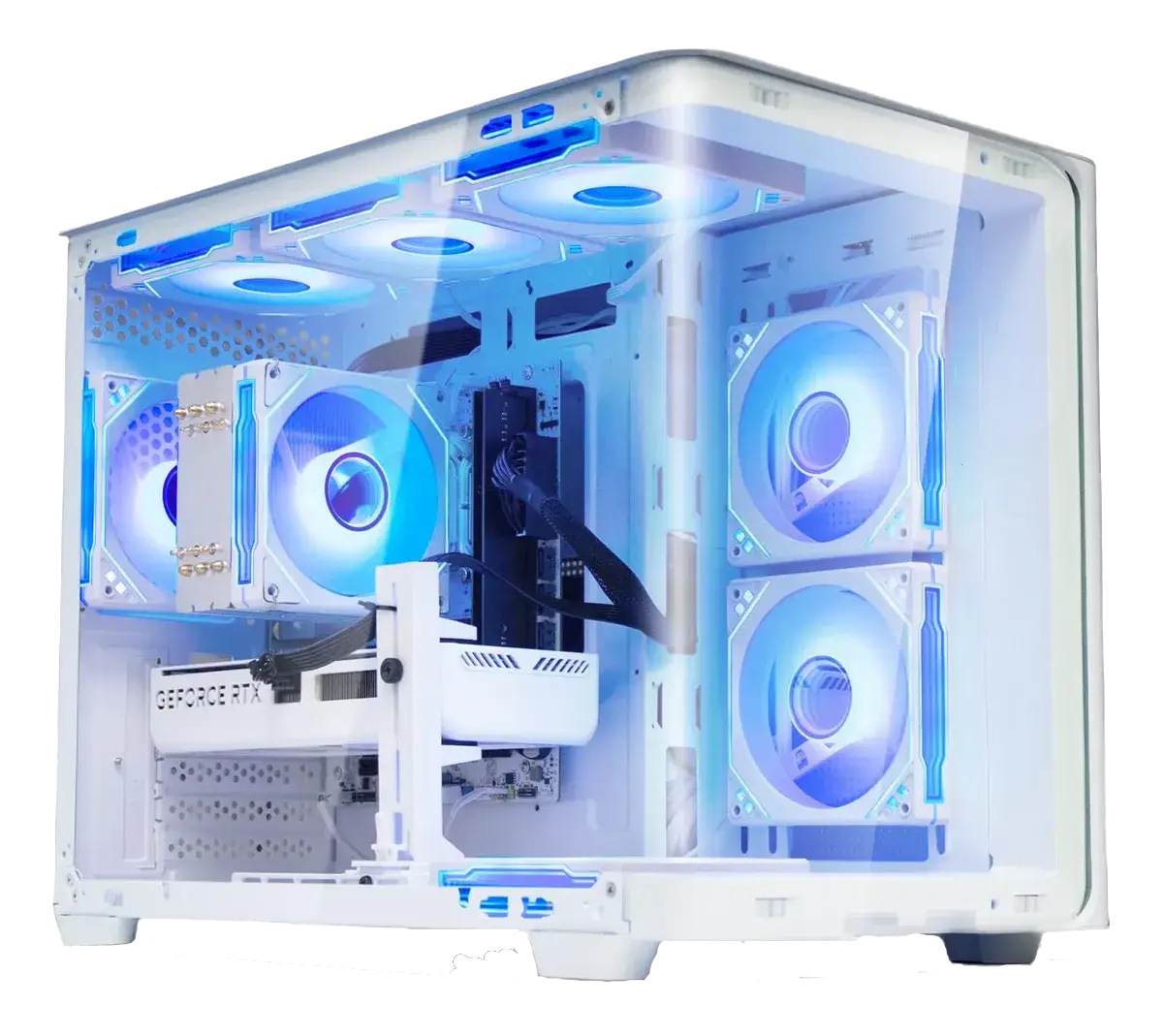
Suevery is one of those brands that shows up in every marketplace search for "prebuilt gaming PC", sold through Amazon, Newegg, Walmart and Mercado Livre, usually at a price that undercuts the big system integrators. This particular configuration, the Core 14th Gen i9 tower, is the flagship of that lineup: an Intel Core i9-14900HX with 24 cores, a GeForce RTX 5060 Ti 8GB, 16GB of DDR5 and a 1TB NVMe drive, all behind a curved tempered-glass panel with RGB fans. This review brings together Intel's and NVIDIA's official specifications, Tom's Hardware and TechSpot measurements of the exact same CPU and GPU, PC Guide's coverage of this exact machine, the retail listings and verified buyer opinions, so you can decide in a few minutes whether it belongs on your desk.
Suevery Core i9 Gaming PC in 30 Seconds
- What it is: a ready-to-run white mid-tower with an Intel Core i9-14900HX (8 P-cores + 16 E-cores, 24 cores / 32 threads, up to 5.8 GHz, 36 MB Smart Cache), a GeForce RTX 5060 Ti 8GB GDDR7, 16GB of DDR5, a 1TB PCIe NVMe SSD and Wi-Fi 6, listed at R$ 11,915.43.
- The question everyone asks first: is that a laptop CPU? Yes. The i9-14900HX is a BGA mobile chip soldered to the board. Intel rates it at 55W base and 157W maximum turbo. In a desktop chassis with real airflow it sustains clocks better than in a laptop and sits roughly between a Core i7-14700KF and a Core i9-14900K in all-core work. The trade-off is permanent: you cannot replace the processor later.
- What the RTX 5060 Ti 8GB really does. Blackwell GB206 with 4,608 CUDA cores, a 2.57 GHz boost, 128-bit 8GB GDDR7 at 448 GB/s and 180W of graphics power, with DLSS 4, Multi Frame Generation and 4th-generation ray tracing. Tom's Hardware measured it 16% faster than the RTX 4060 Ti at 1080p and 17% faster at 1440p; it is a confident 1080p-ultra and 1440p-high card, and an 8GB card first.
- The honest limit: the same Tom's Hardware testing shows the 8GB model falling 18% behind the 16GB version at 1440p ultra, and 26–40% behind in ray-tracing-heavy titles. Keep textures at High rather than Ultra in the newest AAA games and it stays smooth.
- 16GB of RAM is the 2026 floor, not the ceiling. Fine for one game plus a launcher and Discord; tight if you stream or run heavy mods. If it ships as a single stick, adding a second matching module restores dual channel, which is worth roughly 10–16% more average frame rate and noticeably better 1% lows.
- It ships without Windows: retail listings for this configuration specify DOS, so budget for a licence (or run the free unactivated Windows 11) and factor that into the price.
- What you get out of the box, 1TB of NVMe storage, Wi-Fi 6, front and top I/O, three DisplayPort 1.4 plus one HDMI 2.0b output for up to four displays, RGB fans behind curved tempered glass, and standard upgrades (GPU, SSD, RAM, Wi-Fi card) left open.
- Buy it if you want a plug-and-play 1080p/1440p machine with a huge core count for streaming, video editing or 3D work alongside gaming. Skip it if you plan to swap CPUs later, chase 1440p ultra with ray tracing for the next four years, or want a Windows licence included.
Full Specification Table
| Component | Suevery Core 14th Gen i9 | What it means for you |
|---|---|---|
| Processor | Intel Core i9-14900HX, 8 P-cores + 16 E-cores (24C/32T), up to 5.8 GHz, 36 MB Intel Smart Cache, 55W base / 157W max turbo, Intel 7 | Desktop-class multi-thread muscle for streaming, encoding and compiling; soldered, so never replaceable |
| Graphics | NVIDIA GeForce RTX 5060 Ti 8GB GDDR7: 4,608 CUDA cores, 2.57 GHz boost, 128-bit, 448 GB/s, 180W, Blackwell | 1080p ultra and 1440p high with DLSS 4; 8GB of VRAM is the ceiling on texture settings |
| Memory | 16GB DDR5 (platform supports up to DDR5-5600, dual channel) | The 2026 baseline for one game at a time, add a second stick as your first upgrade |
| Storage | 1TB PCIe NVMe M.2 SSD | Fast boots and short load times; roughly four to six modern AAA installs |
| Connectivity | Wi-Fi 6, Bluetooth, wired Ethernet, USB ports on the top and front | Online gaming without hunting for a cable; no dongles required |
| Video outputs | 3 × DisplayPort 1.4 + 1 × HDMI 2.0b, up to four displays | Triple-monitor sim or racing rigs work straight away |
| Chassis | White tower with a curved tempered-glass side panel, colour-changing RGB fans, top-mounted ports, low-noise airflow | Looks far more expensive than it is and stays quiet under load |
| Power | NVIDIA specifies a 600W system supply recommendation for the RTX 5060 Ti | Headroom for a future GPU drop-in without rebuilding the system |
| Operating system | DOS, no Windows licence included | Budget for Windows 11 or use it unactivated at first |
| Price / rating | R$ 11,915.43 at time of writing · about 4.3/5 from 169 ratings on Amazon US | The same configuration sells for roughly $1,350–1,500 in the US, so local taxes and import costs matter |
The Processor: A Laptop i9 in a Desktop. What It Actually Means
This is the single most searched doubt about the machine, and the answer deserves a straight explanation. The Core i9-14900HX is part of Intel's Raptor Lake-HX family: a mobile chip in a BGA1964 package, permanently soldered to the motherboard. Intel's official figures are 24 cores and 32 threads (8 performance cores up to 5.8 GHz with Thermal Velocity Boost, plus 16 efficiency cores up to 4.1 GHz), 36 MB of Smart Cache, 55W of base power and 157W of maximum turbo power, support for DDR5-5600 and 20 PCIe lanes (16 of them PCIe 5.0).
PC Guide, which covered this exact Suevery configuration, puts it plainly: it will not match a desktop Core i9-14900K, but the high core count makes it genuinely strong at heavy processing and multitasking, and at 55W base it is far more efficient than its desktop namesake. In practice the chip sits between a Core i7-14700KF and a Core i9-14900K depending on how much power the cooler and the firmware allow, for gaming at 1080p and 1440p with a mid-range GPU, that is comfortably more CPU than this graphics card needs, so the CPU will rarely be the bottleneck. Reddit's Lenovo Legion and laptop threads, where this same chip appears in towers, repeat two warnings worth reading before you buy: the CPU can never be upgraded, and the memory may be in notebook SO-DIMM format rather than full-size DIMMs, which limits how you expand later. Both are things to confirm with the seller, not deal-breakers, but both should be part of your decision.
The Graphics Card: RTX 5060 Ti 8GB, Measured
NVIDIA's official specification sheet for the RTX 5060 Ti lists 4,608 CUDA cores, a 2.41 GHz base and 2.57 GHz boost clock, 8GB or 16GB of GDDR7 on a 128-bit bus for 448 GB/s of bandwidth, 759 AI TOPS, 4th-generation ray tracing cores, a 180W total graphics power and a 600W recommended system supply. This Suevery ships the 8GB version, which is also the version that decides whether the machine feels fast or frustrated, so the benchmarks that matter are the ones comparing it against its 16GB sibling.
Tom's Hardware's 8GB-vs-16GB face-off is the reference: at 1080p medium the two cards are within 2.3% of each other; at 1080p ultra the 8GB card gives up about 11% overall and 26% in ray-tracing titles; at 1440p ultra the gap widens to roughly 18% overall and close to 40% in ray tracing, with specific games such as Indiana Jones and the Great Circle becoming unplayable at maximum settings. TechSpot's PCIe testing adds a second, less obvious constraint: the 8GB card runs on a narrower x8 link, so once VRAM is exceeded the frame rate collapses rather than merely dipping. The practical reading is simple and it is what Tom's Hardware's own testers concluded, at 1080p and at 1440p with high (not maximum) settings, this card is quick, cool and quiet; the moment you push ultra textures plus full ray tracing at 1440p, the 8GB buffer becomes the wall. DLSS 4 and Multi Frame Generation are available and do lift frame rates on a card of this class, though the gains are most convincing when you are not already short on VRAM.
Expected Experience by Resolution
| Target | Settings | Verdict |
|---|---|---|
| 1080p competitive (CS2, Valorant, Fortnite) | Medium to High | Excellent, high-refresh territory, the CPU has far more headroom than the GPU needs |
| 1080p AAA | Ultra, textures at High | Very good, use DLSS when a title gets heavy |
| 1440p AAA | High with DLSS Quality | The sweet spot for this build |
| 1440p with full ray tracing | Ultra textures | The limit. Expect to drop texture quality in VRAM-hungry 2025–2026 titles |
| 4K | Any | Not the target for 8GB; you would rely on aggressive upscaling |
RAM, Storage and the Upgrade Path
Sixteen gigabytes of DDR5 is the honest baseline in 2026. PcPartsUK and iBuyPower both describe 16GB as the working floor for modern games: Windows plus a single AAA title usually lands between 8 and 14GB, while 32GB has become the comfortable default for anyone who streams, keeps twenty browser tabs open or plays heavily modded games. The other half of that conversation is configuration: TechSpot's classic single-stick-versus-two-stick test measured single-channel memory running 12% lower on average frame rates and 16% lower on 1% lows across thirteen games. If your Suevery arrives with one 16GB module, a second matching stick is the cheapest meaningful upgrade you can make, and the tower has the room for it. Storage is already generous, 1TB of NVMe fits four to six current games plus Windows, and M.2 expansion, a discrete GPU swap and a Wi-Fi card swap are all standard on a chassis of this type. What you cannot change is the processor, and that is the true cost of the laptop-class platform.
Design, Cooling and Everyday Use
Suevery's design brief is easy to read: a vertical white tower with a curved tempered-glass panel, colour-changing RGB fans, ports on the top for quick access and enough airflow to stay quiet at load, and in this it succeeds. At roughly 5.4kg it is light enough to move between rooms, the glass panel shows off the RGB without turning the desk into a light show, and reviewers covering the same chassis note smooth airflow with low noise levels even at peak performance. For daily work, office suites, browsers, photo editing, Discord, streaming software. The 24-core CPU is frankly overkill, which is exactly why the machine will feel effortless. The Wi-Fi 6 radio removes the usual "I need to buy an adapter" surprise, and four video outputs mean a multi-monitor layout works from day one.
Pros and Cons
Pros
- 24 cores and 32 threads, outstanding for streaming, encoding, compiling and 3D work next to gaming
- Real 1080p-ultra and 1440p-high performance with DLSS 4, ray tracing and Multi Frame Generation
- 1TB NVMe SSD and Wi-Fi 6 included, nothing essential to buy on day one
- Four video outputs (3 × DP 1.4 + 1 × HDMI 2.0b) for multi-monitor setups
- Attractive curved tempered-glass tower with RGB fans that stays quiet under load
- Standard, well-understood parts: GPU, SSD, RAM and Wi-Fi card are all user-serviceable
- More CPU headroom than most machines at this price, so the graphics card stays the upgrade target
- Widely available with marketplace buyer protection and around 4.3/5 from verified ratings
Cons
- The i9-14900HX is soldered, you can never upgrade the CPU, and a cooler or board failure ends the socket
- 8GB of VRAM limits ultra textures and ray tracing at 1440p, and it is an x8 PCIe card
- 16GB of RAM may ship as a single stick, costing you 10–16% of frame rate until you add the second
- No Windows licence in the box, listings specify DOS
- Memory may use notebook SO-DIMM format, narrowing upgrade options
- Retailer copy contains errors (it calls the card "Ada Lovelace" and "DLSS 3": it is Blackwell with DLSS 4), so double-check the invoice
- No reviews of the tower's sustained thermals yet; mobile silicon in a desktop needs a few months of user data
Frequently Asked Questions
Is the Suevery Core i9 gaming PC worth buying in 2026?
Yes, for a specific buyer: someone who wants a finished 1080p/1440p gaming tower with plenty of CPU power left over for streaming or creative work, and who does not intend to upgrade the processor later. You get 24 cores, an RTX 5060 Ti, 1TB of NVMe and Wi-Fi 6 in a good-looking case at a price under most big-brand prebuilts with the same graphics card. If your plan involves swapping CPUs, running 1440p ultra with ray tracing for years, or a Windows licence out of the box, look at a conventional LGA1700 or AM5 build instead.
Is the i9-14900HX a laptop processor? Does that matter?
It is a mobile chip by classification: BGA package, soldered to the motherboard, 55W base and 157W maximum turbo per Intel's official specifications. But inside a desktop tower with proper airflow it behaves very differently than in a laptop: it can hold its boost clocks far longer instead of throttling after a minute. Expect performance between a Core i7-14700KF and a Core i9-14900K in sustained multi-core work. What genuinely matters is the consequence: the CPU is not a replaceable part, so this machine's long-term upgrade path runs through the graphics card, memory and storage only.
Can you upgrade the Suevery PC. RAM, SSD, GPU?
Yes for the graphics card, the M.2 SSD, the memory and the Wi-Fi card: this is a standard tower with a full-size PCIe x16 slot and open expansion, and the manufacturer explicitly positions it as expandable. No for the CPU, which is soldered. Before ordering, confirm with the seller whether the memory is desktop DIMM or notebook SO-DIMM format, a detail that matters for which sticks you buy later, and how many of the 16GB ship already installed.
Is 8GB of VRAM on the RTX 5060 Ti enough?
For 1080p and for 1440p at high settings, yes. Tom's Hardware found the 8GB card within 2.3% of the 16GB version at 1080p medium and only 5% behind in rasterisation at 1080p ultra. It stops being enough when you combine 1440p with ultra textures and ray tracing, where the 8GB model trails by around 18% overall and close to 40% in ray-tracing titles. Keep textures at High in the newest games, use DLSS Quality, and the card stays comfortably fast.
Does it come with Windows installed?
No. Retail listings for this configuration specify DOS as the operating system, which means a bare system with no licence. Your options are to buy a Windows 11 key, transfer a licence you already own, or install Windows and run it unactivated, it works, with a small watermark and no personalisation options. Budget for this before you compare prices against competitors that bundle Windows.
Is 16GB of RAM enough, or should I go straight to 32GB?
Sixteen gigabytes is enough for a single game plus a launcher, Discord and a browser, the majority of modern titles use 8 to 14GB on top of Windows. You will feel the limit if you stream while playing, run heavy mods, keep large simulation or strategy titles open, or leave twenty tabs loaded. The best-value first move is not capacity but configuration: make sure the machine runs two sticks in dual channel, which TechSpot measured at 12% higher average frame rates than a single stick. Add a second 16GB module later and you reach 32GB without waste.
How does it compare with building the same PC myself?
Component for component, a self-build with a desktop Core i7 or Ryzen 7 and the same RTX 5060 Ti would likely cost a little less and would end with a socket you can upgrade. What you give up is time, warranty paperwork and the tuning work: Suevery ships a tested, assembled tower with Windows-free firmware, Wi-Fi 6 and four outputs already wired. If you value an afternoon of your life and a single point of contact for support over a fully upgradeable socket, the prebuilt makes sense; if you enjoy building and want a CPU upgrade path, the numbers favour doing it yourself.
Check Today's Price
Live pricing from trusted sellers on Mercado Livre. Suevery Core 14th Gen i9 prebuilt gaming tower, brand-new, boxed, with standard warranty.
Check today's price View on Mercado LivreAs an affiliate, we may earn a commission when you buy through our links. At no extra cost to you. It never changes our opinion.